Automatically Sign in, Login Windows 10 Account on Start [Guide]
Windows users always desire to quickly log into their system by skipping the option for entering user ID and password. It is quite irritating to type your username and password every time your PC boots up. You can easily configure Windows 10 to automatically boot to the desktop or Start screen without having to enter the password by using the method described in this article.
Must Read: How to Disable Animations in Windows 10
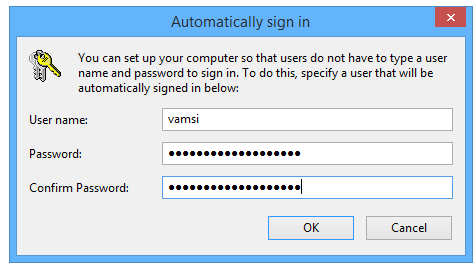
The procedure for automatically logging into your system is similar to that employed in earlier versions of Windows. If you are sharing your PC with others, it is recommended that you don’t allow your Windows to skip the process of prompting user to input his credentials.
Launch the Run dialog box by using the combination of Windows Key+R. Here, you need to type Netplwiz and then press Enter.

You will see the User Accounts dialog. Choose your user account first and then you may uncheck the option marked “Users must enter a username and password to use this computer”. Click “Apply” button to see the “Automatically sign in” box.

In the “Automatically sign in” box, you need to enter the password and then need to verify it by typing it again.
Finally, you are required to click “Ok” button.
In another method, you can involve registry settings to avoid getting into the signing in process when Windows boots up. By using the simple steps mentioned above, you can configure Windows 10 to automatically boot to the desktop. This method will save time for you on each starting up of Windows.
Must Reads: How To Set Lock Screen Notifications in Windows 10